Tuesday, February 21, 2012

Reflection Bridge with Type-N connectors

I always try to avoid using "between-series" adapters - there are so many out there with questionable quality. Sometimes these adapters are just the "necessary evil". In an attempt to reduce the need for adapters, I built 3 different reflection bridges for my N2PK VNA - BNC, SMA and Type-N.
From a mechanical point of view, mating a bridge directly onto 2 fixed distance ports presents a challenge - the connectors must be aligned perfectly. These are precision connectors and even the smallest misalignment will cause stress to the pin/receptacle, uneven wear and possibly damage. Using Type-N flange connectors on the reflection bridge will form too rigid junction and they are difficult to install with such great precision. On the other hand I prefer somewhat rigid connection and don't want to use flexible coax as it introduces phase instability when bent or twisted. A few tenths of the millimeter lateral "play" in the connectors will be enough to take care of small misalignment.
To build the Type-N bridge I used a pair of male Type-N connectors (solder type, Digikey p/n ACX1132-ND) on ~3 cm pieces of semi-rigid coax (RG-402 - solid copper tube shield, not the hand-conformable type). The coax is inserted in a brass tube (very slightly larger than the diameter of the coax, 2.1 cm length, K&S Engineering 3/16 x .014 Stock #129) that goes thru the wall of the aluminum enclosure and it is soldered inside to a brass plate. A second, larger diameter brass tube (2 cm length, K&S Engineering 7/32 Stcok #130) goes over the small diameter tube but does not go thru the wall. The small diameter tube provides stress-relief on pull action, as one end of the RG-402 is soldered to it. The larger diameter brass tube goes over the solder collar in the base of the male Type-N connector and it is compressed between the enclosure and connector, providing stress-relief on push action.
The whole assembly might be a little over-engineered but it is very sturdy and gives me the few tenths of millimeter lateral flexibility at the connector end without being too flexible. It, also protects the RG-402 from accidental permanent bending and damage.

The small diameter brass tube goes thru the wall and together with the protruding copper shield of the RG-402 coax is soldered to a brass plate and the PCB's ground plane. It is critical that the holes in the aluminum enclosure are just big enough for the small diameter brass tube to be inserted with no "play"as the flexibility needs to come from the exposed length of the brass tube. An SMA connector is installed for the DDS source termination (needed for improved low frequency measurements).

Heat-shrink tubing color-coded the IN and OUT of the reflection bridge. For the DUT port I installed a high-quality Amphenol 131-445 / HP-Agilent #1250-1404 female Type N connector. This instrument grade connector has a SMA(f) on the back. A corresponding SMA(m) with really short pigtail (~4-5 mm) was used for connection to the bridge. I had to make a cut-out in the PCB to accommodate the SMAs.

Because of the custom Type-N connectors, I was able to fit the bridge in a lower profile enclosure - same type I used for my RF-IV sensors - Bud Industries CN-5701 (Digikey p/n 377-1512-ND)

Tuesday, January 17, 2012

My 2nd Generation N2PK VNA

I am just about done with my second generation N2PK VNA. The first one I've built is mainly for portable / field use, while this larger unit is for my work bench.
Main differences over my first generation unit:
- built-in USB interface using HSUSB (both VNAs are based on the parallel port PCB ver. 4.3)
- larger enclosure with separate shielded RF deck compartment and PS/USB rear compartment (Hammond 1455T2201, Digi-Key p/n HM905-ND)
- Instrument grade, stainless steel precision Type-N and SMA front panel connectors (Amphenol 131-445 / HP-Agilent #1250-1404)
- All internal RF connections are made with Conformable semi-rigid RG-402 coax (Belden 1673A)

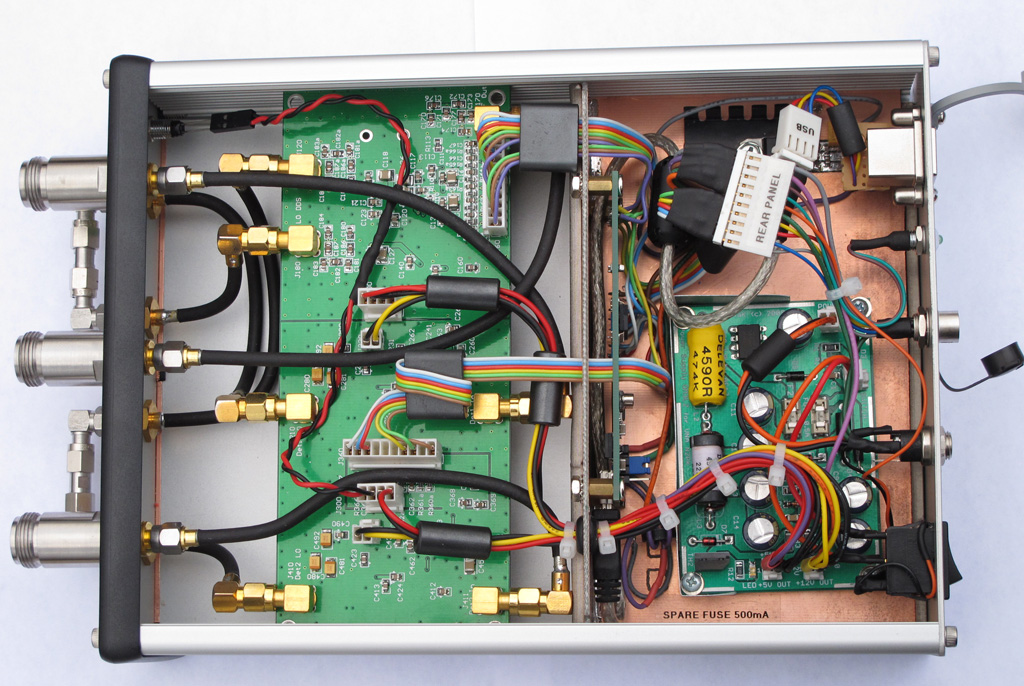
The larger enclosure provides better cooling and thermal stability. I have separated the space into two compartments in order to improve the RF shielding and noise floor. Furthermore, the use of semi-rigid coax requires more space. I must say that working with semi-rigid coax is not an easy thing, even when using hand-conformable type. The connections must be fabricated with a great precision, avoiding re-bending of the coax. I used scrap pieces coax to get the right shape of each link and then carefully followed the shape with the actual coax, bending it only once.

The front panel is using very-high quality lab-grade (read: very expensive) RF connectors. I also improved on the front panel layout. A front panel LED indicates +5V power to the DDS chips.

The rear panel with industrial grade Type-B USB connector. The LED next to the connector indicates power to the USB interface. The USB interface board can be powered by the host computer or by the internal power supply (jumper selectable). I also made a small modification to the HSUSB board to incorporate the VNA PWR DETECT signal directly on the board itself. An Accessory connector is installed for connecting the S-parameter test set, RF-IV test head or any of the two transverters. It is a 6 pin connector with all necessary control signals and +9V power for the accessories.

The power supply mounting bed. The N2PK VNA power supply provides +5v (using a switching regulator), +9V and +12V (linear regulators). There are "crowbar" type over-voltage protections for both, the +5 and +12 V as well as extensive filtering and power conditioning. This picture is with the top RF shield of the PS board removed. The HSUSB board is mounted vertically using stand-offs, on the back wall of the RF compartment shield. The linear regulator and heatsink next to the PS board is for +9V line going to the ACC connector.


The PS mount was constructed by soldering two pieces of copper-clad FR4 PCB material.
On the bottom I mounted copper-beryllium contact clips for better grounding to the aluminum enclosure. When installed, it is a tight fit in the aluminum enclosure, effectively shielding the VNA board from the switching PS and USB interface board. Using such mount, I was able to install everything in the enclosure without drilling any holes and using external screws - it is pure aesthetics but the VNA does look sharp that way.

The noise floor of Detector 1 is slightly better than -120 dB for the most part (0.05 to 30 MHz it is about -122 dB).

In addition, I made a reflection bridge using SMA ports and SMA-to-N adapters. Initially, I was going to built it with flange Type-N connectors but these are more involved (5 holes, 4 screws each) to install and the Bridge becomes too "rigid" while being mounted on the VNA ports. The bulkhead type SMA (f) requires just a single D-hole to install and in general the SMA port gives more flexibility. The SMA connector is not the optimal solution for heavy front panel use but this is not the case as the SMA(m) to male Type-N adapters will be almost permanently installed. I soldered the back of each SMA to a brass strip for improved grounding to the chassis and PCB. An additional SMA (f) connector for low impedance termination (used for measurements below 0.5 MHz) was also installed and connected with a short pigtail of RG-405.

I used a stainless steel, heavy duty SMA on the DUT side as it will see more connect-disconnect cycles than the VNA side SMAs but it required a cutout in the PCB and a small brass plate to solder the ground plane.

Tuesday, November 22, 2011

Experimental Parabolic Microphone

I've always wondered how well a parabolic mic works. Here is my experimental setup for testing such DIY parabolic microphone. It is a great weekend project and will let me experiment with high-gain / low-noise audio amplifiers. The heavily wooded area off my back yard is plentiful of singing birds.


Photographic tripod is used as mount for the parabolic dish. I had to construct a simple mounting bracket and a "focusing" contraption that will let me use different size and shape microphone elements.

I got the actual parabolic reflector from "the place where you can find anything" - eBay. The parabolic reflector is made out of polyethylene plastic. The diameter is 21 inches with focus point 4 inches from the bottom. It came as one solid reflector - I had to drill the mounting hole. I had a few ideas for mounting the dish - I wanted to be compact and simple so I decided on a single hole in the center.

The microphone mounting frame is made from semi-rigid coax (RG-402) and small PCB board for attaching the mic element. I used a threaded cable feed-thru to both - attach the dish to the bracket and mount the RG-402 frame with the microphone. A "sandwich" of metal and rubber washers - including two large and thick rubber washers provides "shock-mount" for the dish. The mic frame is fed through the threaded feed-thru using silicone cemented inserts.

The "focusing" rig lets me move the microphone element to the exact focus point of the dish. The focusing range is about 2 inches. Normally, the mic can be fixed in the focus of the parabola, but I am planing to experiment with different mic elements and they all vary in size and shape so I wanted to be able to adjust the mic frame with no hassle. Two spring-tensioned wing nuts fine-tune the mic frame.

Small plastic container is holding the battery pack, microphone preamp and 900 MHz FM transmitter (a.k.a Baby Monitor - For the initial testing and to validate the concept I just modified a baby monitor and then used my IC-R20 scanner to listen and record). Currently, I am working on my low-noise/high-gain preamp. The radio-channel link sort of works but the noise levels are way too high. Proper mic pre-amp and better (broadcast grade) FM transmitter are planned for the next stage.

Hand-held mode. Large plastic handle salvaged from old angle-cutter provides comfortable grip.
A word of warning - the surface reflectivity of the polyethylene dish is high enough to produce smoke from the mic's wind guard while I was playing with the dish and decided to verify the focus by pointing it at the sun. It took less than a second! I was able to act quickly and saved the guard from catching on fire :) (stupid move but the damn thing looks transparent :-)

Monday, August 22, 2011

Awl modification for Leatherman Wave

I had my original Leatherman PST (Pocket Survival Tool) for many years and when I decided to upgrade to Leatherman Wave, I was a bit disappointed to find out that they have omitted a very useful tool from the set - the awl. If you want to puncture a hole in a coconut, leather belt or an old plastic bottle with Gorilla Glue, a good awl will do the job just fine. The PST has a somewhat small but sturdy and useful awl so I decided to add one to my Wave. I've seen people grinding a 1/4" hex extension driver to make an awl for the Wave's bit driver. The problem with this - it takes A LOT of grinding and it is difficult to precisely adjust the thickness and shape of the base part so it fits and locks in the bit driver - Leatherman is using a modified (flat) version of the 1/4" hex bit with most of the new multi-tools in order to save space in the handle.
This mod is for the NEW Wave tool and it will not work on the old Wave (pre-2004) as the old model is missing the bit driver.

This is the starting point for my awl mod - the bit kit (#930368 - only $5 at Leatherman.com) for Leatherman MUT (Miltary Multi-Tool). Looking at the MUT tool I realized that the bits are compatible with the Wave's bit driver. The set includes 3 combo bits - short Slotted/Phillips, long (2.5") Slotted/Phillips and a long (2.5") hex 7/64 / Torx T15 bit. These bits will fit in Leatherman's standard bit driver (equipped on Wave, Charge, Surge and Skeletool)

I used the long Hex/Torx bit to grind my awl from. This bit is less useful to me than the other two. Leatherman is using pretty good tool steel for these bits as it took me well over half hour of grinding on my improvised grinding wheel (Electric Drill with grinding wheel mounted in the chuck). First, I used a scriber to draw the desired shape in the black oxide coating and used my Dremel Tool to cut off the tip and roughly correct the shape in order to reduce the time spent in grinding. The bit can be shaped in many forms - I wanted a heavy duty awl so I kept more metal around the tip and reduced the size less gradually. This resulted in a "straight-back knife blade" tip that is very strong. For lighter duty it can be shaped with more aggressive reduction of the size from tip to base (sharper, "needle-like" form). The remaining two bits from the kit can be shaped into other useful tools - like a miniature V-blade line cutter/wire stripper (the Wave has one already on the bottle opener), a sharper awl, a punch-down tool or a small pry tool.

As one can see - the overall thickness is pretty good, resulting in a strong and solid tool. Now, there is no need to use (and possibly damage) the knife blade when puncturing holes.

The awl inserted in the Wave's bit driver. It locks nice and firm in the bit holder with absolutely no wobble. For finishing the surface I used a drop of Perma Blue solution (Liquid Gun Blue). The bit has a black oxide coating and the selenium based gun blue blends in perfectly.

Here is another mod. The original Leatherman sheath has a side pocket for a small flashlight and inside pocket to fit in the the two plastic holders with the extra bits kit (#931014). Unfortunately, there is no space for the bit driver extender (#931009) or any of the long MUT bits (and my awl). I used a cheap aluminum (2x AA batteries) flashlight ($1 form AutoZone) to make a container for the long bits/driver extension. I just cut a portion of the aluminum tube of the flashlight body and capped the cut end. The original end cap (normally used to load batteries) serves as the container's threaded cap. The container slips nicely in the side flashlight pocket of the Leatherman sheath. I can fit the driver extender, two long MUT bits, one short bit, large needle and some thin steel wire and rolled up Band-Aid :-)

Friday, June 3, 2011

Wire Antenna Tension Breaker

Wire Antenna's enemy #1 is the wind (Corrosion being #2, Lightning is a topic of entirely different discussion).
In high winds, tall trees sway a lot - the taller the tree is - the bigger is the amplitude. What makes the matter worse is the fact that different trees sway with different frequency and amplitude due to the specifics of each tree - height, canopy, etc. The wind could also blow from different directions for each tree if they are far apart.
Wire antennas are often stretched between tree-tops where the swing is in it's maximum.
In other words, during strong wind almost everything works against the antenna, putting it at a great mechanical stress.
One solution for long wire antennas is to let it sag - the sag could provide enough slack in high wind situation so the antenna is never tensioned to the maximum thus reducing the chance for break. Such approach works fine for long-wire, end-fed antennas.
When it comes to dipoles, one would want the antenna as high as possible. In addition, preserving the flat-top geometry of the antenna also helps the radiation pattern so people tend to tension them a lot.
In order to protect my G5RV from breaking due to tensile stress and to reduce the unnecessary sag in calm weather at the same time, I made a "tension breaker" (it is more of a "fuse" actually)
The idea is very simple - to create an artificial "weak point". If high wind occurs and the sway of the tree-tops puts the antenna under excessive stress, the "tension breaker" opens at a predetermined tension load, releasing more slack in the antenna rope and relieving the stress by letting the antenna to sag. When the weather calms down, the "breaker" could be easily "reset", stretching the antenna back to it's original state.


The "tension fuse" is located near one of the antenna rope's anchor points. The actual "fuse" is two lengths of "50 lb test" Spectra Line braided (yellow) filament between two Quick-Links (each rated for 220lb load). The filament should break at a load >100 lb (2 x 50lb). A test sample broke at ~120 lb. I am using AWG #12 wire for the antenna (tensile strength ~ 220 lb) and 3/16' double-braided polyester antenna rope with break strength of 770 lb). Even if I de-rate the breaking load for the whole antenna because of the antenna insulators, knots, soldering etc., the filament "fuse" is still going to be the weakest link. Once it breaks, it will release a slack of approx. 6 ft of antenna rope (bottom-left on the picture). To "reset" it, I have prepared a couple of extra "tensile fuses" which can be installed between the Quick-Links in 5 min.
The trick is to have such weak point to break only at a load dangerous for the antenna and withstand the load of moderate wind conditions while keeping the antenna tensioned for minimal sag.

Monday, May 2, 2011

Antenna Launcher Digital Scope Part 2

These are the final touches to the Digital Scope System and the Antenna Launcher.

I made a hood out of a sheet soft closed-cell foam and attached it to the aluminum frame of the scope with Velcro for easy and quick installation/removal - takes 5 seconds to install it. This picture also shows the trigger support bracket and the safety strap for the trigger.

This hood works very well - it reduces dramatically the glare and improves the display contrast on a bright sunny day.

What's better way to calibrate the accelerometer sensor than Mother Earth's gravitational force? I glued a small Spirit Level to the frame to aid the GeoCam software calibration. After the scope is installed and level (according to the Spirit Level), the GeoCam calibration routine is executed to establish 0 degree pitch reference point.

Update on performance: The antenna launcher and the scope system work fantastic and I couldn't be happier! At 40 psi (less than half of the maximum 100 psi pressure), shooting at a very steep angle (75 degrees) and towing a line, I was able to go over a 110 ft tree with huge reserve in the trajectory. The scope allows for repeatable and well controlled launches - I was able to produce a nice group - 3 consecutive launches where the ball falls within 2-3 yards area every time with peak height of the trajectory of over 150 ft (4 oz ball, no wind, no line). Spray of silicon lubricant on the ball, lubricates the inside of the barrel too and makes for easy loading and probably decreases the friction during launch - with Schedule 40 2.5" barrel the tennis ball is a tight fit - SDR-21 type pipe is recommended for better fit and weights less but it is also less sturdy.

Monday, April 25, 2011

Digital Scope for the antenna launcher

Sometimes great ideas shine, just because of their simplicity and I think I had one the other day. (You can tell that I am modest person :-). I am claiming to have the most sophisticated aiming system of any pneumatic antenna deployment apparatus out there.

Here the Head Up Display of my "Augmented Reality Digital Scope". aiming at 56 degree up at a tree-top in my front yard. The scale for pitch (gun barrel angle) is displayed on the right.

The Scope mounted on my "steam-punk" antenna launcher. I know! The mount of the scope should have been made out of wood.

Front view. The Scope mount is attached with Velcro tape to the barrel for easy installation. Calibration of the scope is possible while mounted but it can be performed before installation on a perfectly level surfaces for greater precision.

This is the Scope's quick mount. I fabricated the mount out of aluminum L-stock. A piece of scrap 4" PVC pipe was used for the bottom part. I softened the plastic using heat-gun and formed it to fit tight around the 2.5" barrel. Small Velcro straps are used to secure the instrument in place. It takes about 30 seconds to install or remove the actual scope .

Cross-hair view down the barrel. Scope is secured in the mount and installed on the antenna launcher. Note the blue closed-cell foam padding between the barrel and the mount. It gives a very firm, non-slip grip for the mount

Ta-Daaah! Here is the secret :-))) The Scope is actually my Android OS smart-phone and it cost me absolutely nothing :) (I already had the phone). That's why it was important for me to be able to easily install and remove the phone from the mount. I fabricated the mount to fit my specific model phone - T-Mobile G2 (HTC Desire Z) but it can be modified for any phone.

Another view of the mount. Note the little cut-out for the phone's digital camera. The construction is very light and sturdy. The phone has a gel-skin to protect and further enhance the mounting.

The heart of the aiming system is a free app called GeoCam v.2.07, available on the Android Market or it can be DL from here. I came across this app accidentally and my first thought was - this could be useful for something one day (it used to be called Theodolite). It displays a wealth of information and it can triangulate objects in order to measure distance and height. The phone's accelerometer sensor is used to measure pitch (essential!!) and roll (the roll is kind of useless for the aiming system). It is using the internal magnetic sensor for the heading (compass) and GPS receiver for coordinates.
All this information changes dynamically and it is super-imposed over live video image from phone's digital camera. One can adjust colors of the HUD data and control the iris (exposure compensation) - very useful for use in bright, sunny day. (I am thinking of making some sort of rigid hood for the display to enhance further the contrast in bright ambient light and reduce glare). There is also a nice calibration procedure - very useful to account for differences between each installation.


The Digital Scope system works fantastic and brings the spud guns to the 21st century!! I think I'll apply for a patent on this one:)


Update: I am currently working on a BBTS or Basic Ballistic Trajectory Solver for the Android OS. The idea is to be able to input the distance to the tree, assuming the tree will be located under the peak of the trajectory, Tree Height + some padding , Tennis ball weight (for drag force calculation, I have data for the average drag coefficient of a tennis ball), Air density/Altitude (again for drag) and additional drag value (caused by line, the ball is pulling - there is no easy way to model this so it needs to be determined experimentally and entered as correction to the drag force)

The output will be a firing solution - Angle and required Muzzle Velocity. The tricky part will be to establish the correlation between the air tank pressure and the initial velocity of the ball leaving the barrel, but I'll work on a way to figure it out (police radar?).

Saturday, April 23, 2011

"Say Hello to my little friend!"

Update: If you are looking to buy an Antenna Launcher for Field Day, please check this post.

Tony Montana's famous words as the answer to the question: How do you get an antenna rope over a 100+ ft tree-top? Forget about slingshots or bow and arrows. Even the crossbow with optical sight is so last century :). Enter: the pneumatic antenna launcher or shall I say "pneumatic blunderbuss";-)Here is the result of a couple of evenings spent in the garage - cutting, gluing and painting PVC pipes.
This antenna launcher is based on (WB6ZQZ) Alan Biocca's CSV19 with some modifications / improvements on my part. His web site (http://www.antennalaunchers.com/) is an excellent source of information on these launchers and it has very detailed build instructions. I had to do something about the white PVC look which I REALLY hate! The paint job was inspired by K4ICY and his "Steampunk" antenna launcher.
The main changes from Alan's CSV19 design are:
- Slightly larger compressed air tank - my launcher is using 10 inch length of the 4" diameter pipe for the tank vs. Alan's 8 inches. The reducing coupler I am using as part of the tank gives a little extra volume too.
- Longer barrel - 18.5 inches vs. Alan's 16 inch barrel - I had lengthen the barrel a bit in order to account for the larger pressure vessel and have enough clearance for the Zip Reel.
-More reliable and safer pressure vessel - instead of drilling a hole for 1" pipe and epoxy gluing the pipe for the high pressure outlet in a 4" end cap, I am using a 4" to 2" reducing coupler and then 2" to 1" reducing bushing as part of my pressure vessel. Another advantage is that I don't have to drill precision large diameter hole - unfortunately I don't have a lathe.
-More reliable and safe coupling between the barrel and the high-pressure pipe - I am using 2.5" to 2" reducing coupler and 2" to 1.25" inch reducing bushing. It is much easier to assemble the launcher that way! Alan's design yields for drilling a 2.5" end cap and epoxying the 1.25" inlet (actually, a 90 degree elbow) in the hole
-I made the spacer between the pressure tank and the barrel out of two pieces PVC, sliced from 4" pipe scrap. I adjusted the curvature of each piece to follow the outside diameter of the corresponding pipe and glued the pieces back-to-back.
-In a moment of sheer brilliance, I came up with the Augmented Reality Digital Scope. The HUD (Head-Up Display) on the scope shows the firing angle of the barrel (pitch), heading, roll, and geographical coordinates. It is also capable of measuring distance and most importantly height of an object (tree). (Scope is not shown on the picture above)This is probably the most significant improvement to the launching system I am willing to take credit for as it allows to correct your shots in a precise manner by adjusting the exact angle of launching. About the only thing I am missing is on-screen display of the air pressure in the tank. More on this in a later post...

The main source of PVC hardware for this project was http://flexpvc.com/. Trigger, pressure gauge and Schrader valve are available from McMaster (the trigger is part 6852K11). Rainbird 100DV-SS sprinkler valve is from eBay. The bow-fishing zip reel is from an online archery store. Brass fittings, brass street elbow and aluminum stock (for the Zip reel mount and support strut) - all from Home Depot. Tennis balls and Spectra line (150 yards spool / 50 lb test) from Sports Authority. For all threaded connections (sprinkler valve to trigger valve, pressure gauge, Schrader valve) one should use the yellow type Teflon tape - it is made specifically for gas/high-pressure applications and seals much better than the standard white plumber's tape. I hated the rattling sound of the coins (used to bring the weight to 4 oz) inside the tennis balls so I injected the balls with polyurethane foam (used to fill gaps). For the tennis ball tie, I used a loop of string with a knot, drilled a penny right in the center and inserted the loop thru the hole. The knot should be large enough so it cant go through the hole. Then I inserted the penny vertically in the tennis ball thru the narrow slit I previously made. When I pull on the loop, the penny wedges flat across the slit - this solution works just fine and after I filled the ball with foam there was no need to stitch the slit - the foam glued the slit and the pennies inside.


This picture shows the installation of the Saunders Bowfishing Zip Reel. Two aluminum bars are attached to the zip reel and the 2.5" coupler is mounted in the center with countersunk screws. (the bottom side of the coupler was filed flat to form two "saddles" for the mounting bars). It is loaded with 150 yards of high-visibility Spectra-Line (50lb test). I even installed a little cutting blade (the yellow thing on the bottom) for added convenience. This line cutter was part of the Spectra Line packaging - i just had to cut it out from the plastic spool-holder.

Update: In the original design the trigger valve could loosen or over-tighten if one is not careful - the valve is not fixed - it relies entirely on the thread and because it must not go all the way in (the street elbow is just partially threaded, 2-3 turns max), accidentally rotating the valve in either direction could cause a variety of unwanted effects.

Alan, WB6ZQZ suggested to use a strut to support the trigger so this is what I came up with. Small piece of curved PVC (scrap 4" pipe, heat gun, 2.5" pipe used as a form for bending and sanding) is drilled for a countersunk screw then glued to the barrel with the screw in place to create an anchor point. An aluminum bar is used as a strut between the anchor point and a brass trigger outlet extension. The red cable-tie is the "safety" (currently in ON position) - it prevents accidental operation of the trigger.
Another solution for the strut anchor point is to drill, countersink and install the screw from inside of the 2.5" to 2" coupler BEFORE the 2.5" barrel pipe is glued. The hole for the screw should be drilled in the middle (or closer to the edge) of the 2.5" portion of the coupler and the countersinking should be deep enough to allow for smooth installation of the barrel after the screw is inserted. There is not much clearance for right-angle drill -the countersink can be done with RA Dremel attachment or manually by hand.

Monday, December 6, 2010

Flight Simulator Update

Lately, I've been working on a compete update of my flight simulator. The new configuration is a setup of 4 machines. The server machine is an IBM Intellistation Z-pro (dual CPU)/ 2 x Xeon 3.8 GHz(2MB L2 Cache)/4GB RAM/1TB SATA disk/nVidia Geforce FX 8800 Ultra - it is the mainframe for the MS Flight Simulator X and the Wideview server software. There are 3 panoramic view render clients - each of them is an Intellistation M Pro, dual xeon/2GB RAM/72GB Ultra160 SCSI/nVidia Geforce 6800 Ultra. The clients render Left, Front and Right Panoramic cockpit views ( separate copy of FSX + Wideview clients). The panoramic view display is composed by 3 x 23" Widescreen LCDs (made by Accer) connected via DVI cables.
Currently only 2 render clients are online as the front view is rendered by flightsim server. In the final configuration, I'll have the server displaying the instruments panels, control panels and the GPS on two separate monitors and the front view will be rendered by a dedicated machine. The whole display setup in its final version will be composed of 3 monitors for the 135 degree panoramic cockpit view (top row) and 2 additional monitors for the instrument panels (bottom row).
For the radio stack, autopilot control panel and the switch panel I am using separate hardware panels (by Saitek). The flight controls are Pro Flight Yoke system and throttle quadrant and Pro Flight Rudder pedals by Saitek.
The major item left to be completed is the display setup. I have to figure out how to raise the panoramic view monitors so I can have the instrument panels on the bottom row. I'll post pictures once the whole setup is completed.
I've done some crude testing (using 3DMark06 ) to compare Quadro FX 4600 vs. GeForce 8800 Ultra. Both cards are based on the same G80 nVidia chip and are very similar - the Quadro is the "pro" version with a few extra hardware features enabled and using special drivers aiming at high accuracy rendering. The Geforce is the "Gamers" version where high FPS is the primary goal - the G80 nVidia chip is a bit overclocked in the "Ultra" version. The test was done in 1920 x 1080 dual monitor setup /w 2x2 AA enabled and bilinear filtering. As it turned out the Geforce 8800 Ultra is the faster card so I am using it in the main flight sim box.

Tuesday, September 28, 2010

N2PK VNA Transverter options

The N2PK VNA frequency range can be extended by using transverters. While the N2PK VNA covers the entire 0.05 to 60 MHz, additional frequencies are covered only on specific bands. Paul, N2PK and Ivan, VE3IVM developed two transverters in order to cover the 2m and 70 cm amateur bands.

Both transverters share exactly the same design and PCB with only a few differences in the BOM - the frequency of the Local Oscillator (180 MHz for the 2m version and 400 MHz for 70cm) and the the components of the Band Pass Filter (different set of components for each filter, changing their frequency range).
I started with the 2m transverter kit from Ivan, VE3IVM. It was an easy and pleasant build - Ivan provided a partial kit - PCB, LO, BPF coils, balun transformer for the bridge, both mixers and a power splitter- the rest of the BOM is from Digikey.

The top side of the PCB. The 4 coils of the BPF are shielded, each in its own compartment. It is important that they are centered and lifted from the ground plane in order to increase the Q and minimize losses. The other components are the LO, both mixers, RA SMA connectors and the voltage regulators - +6V and +5V. The most time consuming task here is to make and install the shield for the BPF coils - a certain level of precision is required while fabricating the RF shield as the tolerances are not very large. The top cover is soldered during the finalization stage. I used tin-plated brass sheet to make all RF shields - this material is very easy to form and solder.

Most of the components are installed on the bottom side. Again, a lot of attention is required when building the BPF and the bottom shield for it. After adjusting the BPF, the bottom shield is installed and the filter is checked and re-aligned again as the shield might de-tune it a little. The attenuators are pretty small and should be soldered very carefully. Same thing goes for the 100 Ohm 0604 bridge resistors. The two amplifiers should be soldered carefully to avoid over-heating. Ivan provides specific instructions for installing the variable caps - no flux (or very minimal) should be used and the board must be washed with alcohol or flux remover to avoid mechanical damage to the trimmer capacitors. This picture shows an incomplete and bypassed Low-Pass filter on the low-side output. The jumper is removed and the rest of the components are installed during the finalization stage and after final alignment of the BPF.

This is a plot of the BPF frequency response from the initial alignment of the filter. I was aiming at 143 MHz - 153 MHz range. The BPF filter design allows for almost 10 MHz bandwidth in the 2m band and 20 MHz at 70cm. It can be moved a few MHz up or down from this general range if needed just by adjusting the variable BPF capacitors. During the alignment, it is important to achieve as flat as possible band-pass response and proper shape of the skirts. MyVNA really simplifies the use of transverters and takes care of all calculations - the user must enter the LO frequency and frequency range for the high side and myVNA translates this to the VNA's HF working range, while making a plot in the transverter's frequency range.

This picture shows the 70 cm transverter. The most visible difference between the two transverters is the configuration of the band-pass filter. For instance, on the 2m transverter there are some BPF capacitors mounted on the top side just under each coil - they should be installed before the coils are soldered. These are omitted in the 70cm version.

The BPF frequency response of my 70cm transverter. The insertion loss at 70cm is higher then the one of the 2m transverter at about -13 db. It can be lowered to up to -6 dB if some of the bandwidth is sacrificed but I wanted to cover the whole 430 - 450 MHz range.

The finalized PCB. Shown here is the completed Low-Pass filter and the RF shielding of the BPF. As Ivan, VE3IVM noted in his build instructions, after installing the BPF shields they will slightly de-tune the filter. As expected, I had to re-align it again. A fence-type shield was installed to divide the up-convert and down-convert paths in order to reduce stray coupling and cross-talk.

Almost done. I installed a toroid choke on the power line. Ivan has designed the PCB to fit in a compact extruded aluminum box - Hammond 1455C801. The board fills up the space with very little room to spare - just enough for the RF choke. It was a bit tricky to drill the holes for the SMA connectors in both panels so they match perfectly the RA connectors - the board has a small horizontal play which helps it a little. A small piece of conductive RFI gasket material (neoprene covered with metalized fabric) is pinched between the base of the RA SMA conectors and the front aluminum faceplate in order to improve grounding of the aluminum enclosure.

This is the front panel. The labels on the top row are for Transmission mode measurements and the ones on the bottom - for Reflection. I made the small jumper (needed to configure the transverter for Reflection measurements) out of semi-rigid hand-formable RG-405 coax and used a spacer made from a strip FR4 board to fix the distance between the connectors.. The Hammond box is assembled in a way so the plastic trim for the front and rear panels is on the outside (instead of the "normal" way - between the enclosure and the panel plate). This improves the RF shielding as the end panels are in direct electrical contact with the enclosure - there is no gap.

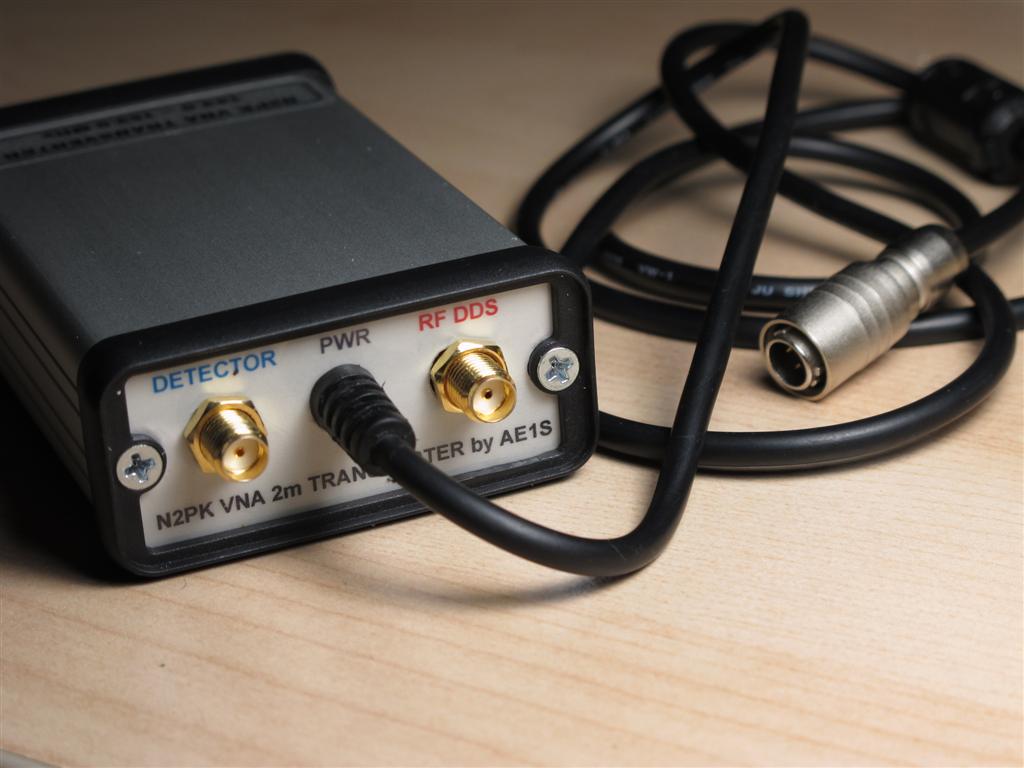
The rear panel and power cable. The Hirose connector for the power cable is the same type that I am using with my RF-IV test head. The accessories connector on the VNA's back panel provides +9V DC and I can power the RF-IV or the transverter directly from there. Two small semi-rigid coax jumpers with Male-BNC to Male-SMA are used to attach the transverter to the VNA's ports. Each of the transverter's ports has a Male-SMA-to-Female-SMA port saver installed (not shown).

Friday, September 17, 2010

3.5mm VNA Calibration Standards

Lately, I've been obsessing with calibration standards. I know that it is an overkill to use lab-grade calibration kit rated for up to 26 GHz with a home-brewed 60 MHz VNA, but the commercial calibration kits are well documented and come with cal reference definitions (data about offset delay, stray C for the OPEN, stray L for the SHORT, etc. The data is stored on a disk and normally loaded in the VNA but it will give me chance to properly measure/characterize my DIY calibration kit. This way I can have the proper constants for my DIY standards entered in MyVNA software. It will also help me to match the calibration plane with the port connector mating plane and measure other connectors or adapters.
I picked up a nice calibration kit on eBay for a very reasonable price (these kits are normally VERY, VERY expensive, but I guess I was lucky this time). The kit is equipped with 3.5 mm connector. This type connector was developed by Hewlett-Packard and it is used in lab instruments for microwave measurements. The 3.5mm connector is using air dielectric and it is machined to extremely tight tolerances. It is rugged (compared to the SMA), allowing thousands of connect-disconnect cycles with repeatable results. The beauty is that it mates with standard SMA connectors. On the flip side - it is a precision lab grade connector and one should be extra careful when handling and using - it could be easily damaged when mated with low-quality SMAs or by poor mating technique.

The geometry and construction of the 3.5 mm connector provides mode-free operation up to 34 GHz. My kit is actually made of two different sets - the male cal standards are rated for up to 26 GHz and the female for up to 9 GHz. Such kit requires proper care and storage. The male pin and female receptacle are supported only in the back of the connector (air dielectric) and can be damaged by rough handling/cleaning. Enemy #1 of these connectors are low-quality or already damaged SMAs. When mated with such, a damage is almost certain to occur.

"DO NOT ROTATE"! This is very important rule when the 3.5 mm calibration connector is mated! The cal standard must be held / clamped in a way to prevent any rotation of the whole cal standard body - only the nut should be rotated. This is especially important with the female connector! The pin receptacle of the female connector is EXTREMELY DELICATE!

The female pin receptacle under 10x magnification. Note the 6 contact fingers, lining the inside wall of the pin receptacle. They are barely visible on the picture under 10x magnification and even people with very good eyesight could not always see with a naked eye if there is a damage. When the body of the connector is rotated during mating or any of these contact fingers gets caught by a burr on a low-quality male SMA center pin, the whole calibration standard becomes a very expensive paper-weight. A center pin, protruding too much, pin with out of specs diameter, misaligned pin, improper cleaning attempt are just some of the things that can cause irreversible damage to the female receptacle. The male pin of the 3.5mm is more rugged but still requires a lot of attention when mated or cleaned.

Tuesday, September 14, 2010

VNA Calibration Reference Plane

Having different types of calibration standards helps to cancel out the measurement error introduced by the use of connector adapters. If the DUT has a port type different from the one of the VNA, the use of "between series" connector adapters is inevitable. Using a calibration standard which mates with such adapter will move the calibration reference plane at (or close to) the DUT, "absorbing" the adapter in the calibration process. Speaking of calibration reference plane - the concept is very simple - the reference plane is the plane which divides the VNA-DUT system. Everything "behind" the plane belongs to the instrument and will be taken out of the measurements. Calibration is performed at the plane. Everything at or "in front" of the plane is treated as DUT and it will be measured. Often, calibration device can not be placed exactly at a specific plane inside the VNA's port connector or test fixture due to the standard's physical size and/or need for a connector. There is an electrical length associated with the cal standard (pin / mating plane to actual OSL plane) which will cause a small delay and phase angle error (such standards are called an "offset" type). To account for this phase shift, commercial calibration kits come with a floppy disk containing correction data for the offset among other parameters (for instance - the stray capacitance for an OPEN or the stray inductance for a SHORT). After calibration is performed and the corrections are applied to the calibration model, the reference plane is "moved back" and located at the port's mating plane. For this very reason, when a calibration standard is measured as DUT with already calibrated VNA, it doesn't look "perfect" - the VNA shows the standard's internal phase offset and strays.
An excellent technical article about calibration standard definitions by William Highton (Chemandy Electronics) can be found here.

The main reason for matching the calibration reference plane and the mating plane of the VNA test port connector is to allow industrial VNAs to measure whole assemblies and devices, including their connectors. In the N2PK VNA (at least with the original software) the reference plane is assumed to be where the physical OSL calibration takes place. Instead of adding negative offset to move the reference plane back to the mating surface of the VNA's test port connector, it is accepted that the plane is right at the rear surface of the calibration standard connector (the location of the actual Open-Short-Load). The error introduced by the electrical length of the pin inside the connector is not that great at lower frequencies - for instance, assuming teflon dielectric (VF ~70%) in a standard SMA connector used for a home-brewed calibration standard, an offset of 5 mm will yield about 0.5 degree phase error @60 MHz. Commercial calibration standards use air dielectric, but this puts greater mechanical requirements during the fabrication process. By calibrating the VNA so the reference plane is on the back of the cal connector and fully exposed, it is more convenient to measure a single component but it means that the DUT test fixture should be made of (or at least include) the same type connector as the one used for the home-brewed calibration standards in order to maximize the accuracy. The setup can be as simple as the component (DUT) is just soldered on the back of the "test fixture" connector, while measures are taken to minimize external error (minimal lead length). With SMDs, this approach works well as the device is practically located directly at the "reference plane" when the test fixture connector is from the same batch connectors used to make the OSL standards. Another method for calibration is to use the test fixture connector itself for calibration - for OPEN the DUT is simply omitted, SHORT and LOAD are created on the spot during each calibration step and finally the DUT is soldered (Still, stray C for the OPEN must be known)