
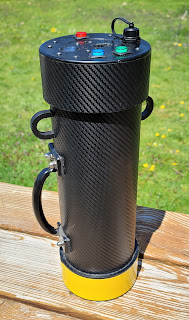
Gamma Dog Maxi was built with basically the same 3D Printed housing that Charles designed, but extended to fit a large 63x63mm NaI(Tl) detector. It is much closer in size to my main Gamma Dog line with 4" diameter housing and since I was reusing the old Gen3 electronics, this unit received the electronics package with serial number "AS001"

Beyond the larger housing size and construction is identical to Gamma Dog Mini.

The unit is slightly shorter than my workhorse GD and lighter than the original GD series but still fairly heavy due to the weight of the detector.
I also made a strap with handle to hang from when scanning near ground level

The old end-cap, housing the electronics has an identical design to the new one but components are mounted with more exposed fasteners on the front face. I updated all 3 electronics packages with digital volume control and wired the charge-indicator / Squelch-Set LED in the Green button (previously unused in these units). The only thing missing when compared to Gen4 is the High-Voltage PMT Bias voltage-divider / voltmeter.
This is not a huge issue as the detector is fixed and sealed and there is no intention to make it field-swappable. The diagnostics routine automatically excludes the HV-Supply health-check at startup for these Gen3 boards.

Gamma Dog Maxi and Mini side-by-side.
One advantage or the red housing is that I dont have to look hard to find them when I leave them aside to dig.



6 comments:
Hello Andrey, i know, this is not the right place for my question. But all other ways to reach you were abandoned. And here is no PM-function.
I am a long-time Pebble user and a long-time user of your TH10c watchface. I found your website via Google and hope to reach you this way.
You may have heard that the Pebble company is back. Eric Migikowsky has revived the brand, and you can currently purchase newly developed Pebble watches at "https://repebble.com".
Your TH10c watchface (https://apps.repebble.com/5583149d9e90900c0e0000d6) has always been one of my favorites. Its excellent configurability, in particular, makes it one of the best watchfaces out there. It can still be installed on the new Pebbles, too. Unfortunately, however, the configuration page can no longer be accessed because it links to "http://webpages.charter.net/kotarak/th10-config348.html" and that page no longer exists.
I wanted to ask if you might consider returning to the Pebble project as a developer and updating your wonderful watchface. The community and I would be very grateful.
Best regards,
Hardy
Hi Hardy, I am glad you are enjoying the TH10c watchface. Recently I become aware of the Pebble come back but claiming access to the pebble store as a developer is not very clear nor friendly - I made an attempt but appears they are asking access to my github repos or sending them the source code. While my watchface is completely free for anyone to use, I dont feel surrendering my code to Pebble as a company given their history. I will still try to see if I can re-claim my watchfaces to my current account. Please see this link - https://www.reddit.com/r/pebble/comments/9ltvhb/th10c_watchface_settings_page_wont_load_advice/
and specifically the comment section - I commented with links to the watchface with working config.
After the OG Pebble closed doors I recompiled the watchface and re-hosted the config page and published the pbw for DL. You can download the files and side-load to your watch.
I understand that the Appstore is a more convenient option and hopefully will be able to update the watchface there as well but for the time being please use the files from link above.
Hello Andrey!
WOW! What a wonderfull reply! I am sooo glad, that i reached you. Thank you.
I was able to install and configure your PBW-File. That's a very good solution for now.
I am a developer too and i was able to claim my account some weeks ago.
At first it seemed to be very complicated but at least it was quite simple. You don't need to give them your source codes.
I just logged into my Rebble-account at rebble.io, then went to https://dev-portal.rebble.io and made some screenshots from my old watchfaces with their ID's and from my Developer-account-page with my Developer-ID.
Then i went to the new Pebble-Appstore (apps.repebble.com), searched for one of my old watchfaces and claimed it via "Is this you? Claim your app". I had to type and click some things and after that i got an email from appstore@repebble.com where they said, i have to proof my ownership. I simply sent them only my screenshots back and after 2 days my account was approved.
Sorry again for hijacking your blog here.
I hope to see you soon again as a pebble developer.
Best regards,
Hardy
I never had a Rebble account. After Pebble went out of business I was pretty much done with the development and never linked my old Pebble account to a Rebble one so I am not sure if this path is available to me. Considering how miserably it failed the first time I am not really sure if I want to invest time developing for this platform - the new pebble is run by the same person who bankrupted it the first time so there is that.
Post a Comment